---
title: How to gain access the area behind the Divider Panel in an Ascaso Steel DUO/DUO Plus PID
description: Disassembly process for Ascaso Steel DUO / DUO PLUS PID home espresso machines to gain access to embedded electrical assemblies for diagnostics and troubleshooting.
---
[Skip to content](https://support.ascaso-usa.com/how-to-gain-access-the-area-behind-the-divider-panel-in-an-ascaso-steel-duo/duo-plus-pid#main-content)
English
Show submenu for translations
[](https://ascaso-usa.com/)
Open main navigation
Close main navigation
- English
Show submenu for translations
- [Contact us](https://ascaso-usa.com/pages/contact-us)
[Contact us](https://ascaso-usa.com/pages/contact-us)
Search here for related support articles
- There are no suggestions because the search field is empty.
1. [Ascaso USA Support](https://support.ascaso-usa.com/?hsLang=en)
2. [Troubleshooting](https://support.ascaso-usa.com/troubleshooting?hsLang=en)
3. [DUO/DUO Plus](https://support.ascaso-usa.com/troubleshooting?hsLang=en#duo-duo-plus)
# How to gain access the area behind the Divider Panel in an Ascaso Steel DUO/DUO Plus PID
## Steps to gain access to parts region behind Divider Panel in Ascaso Steel DUO / DUO Plus PID to gain access to steam pump, top of steam thermoblock, and other embedded assemblies.
**Step 1)** Remove the top panel screws (the top 2 screws on the back panel, use 2.5mm metric allen key)

**Step 2)** remove the ground wire from the top panel
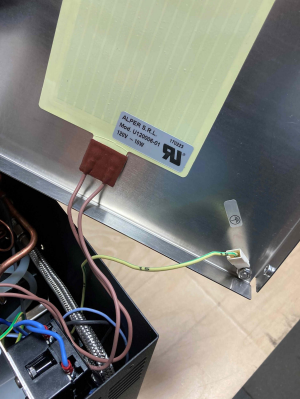
**Step 3)** Remove 3 screws from the back panel, side panel and inner panel
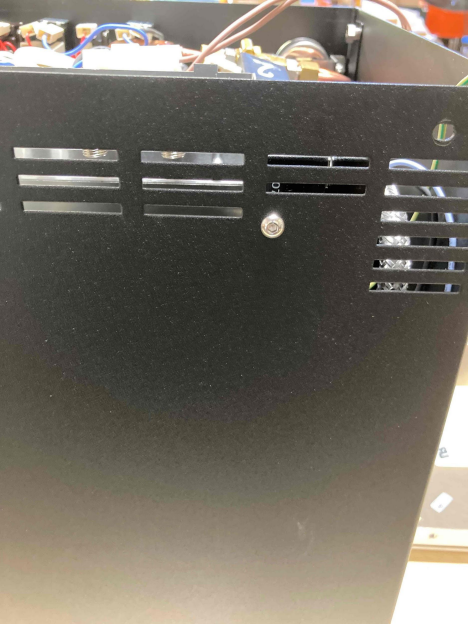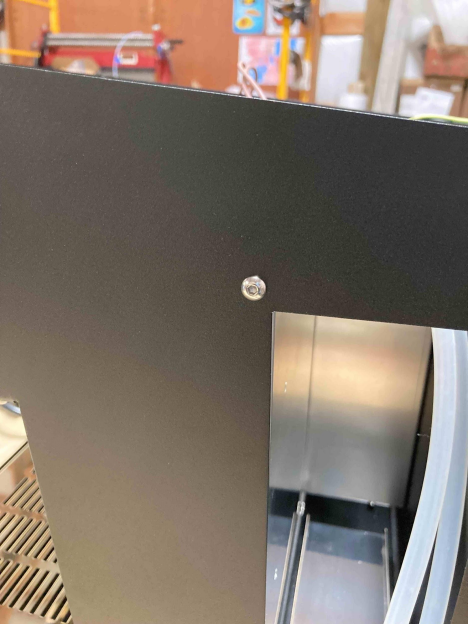
**Step 4)** Remove the silicone exhaust tubes (x2)
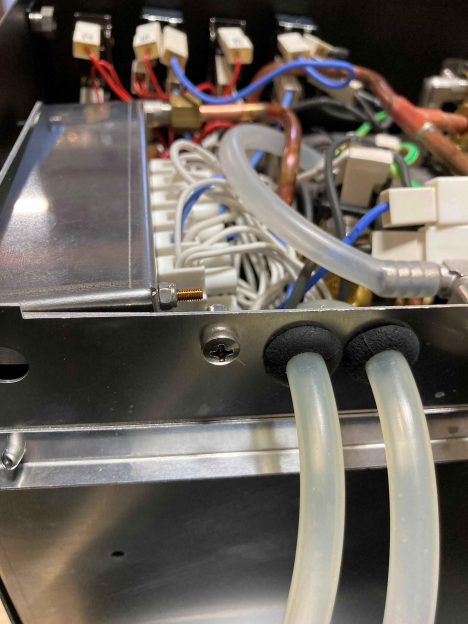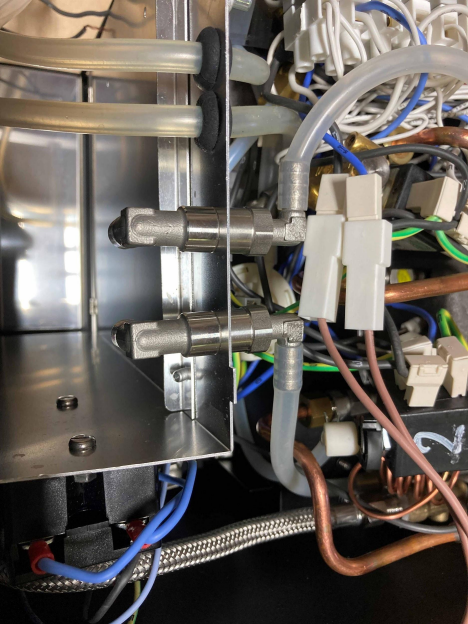
**Step 5)** Mark the water suction/discharge tubes and gently pull them towards the front of the machine
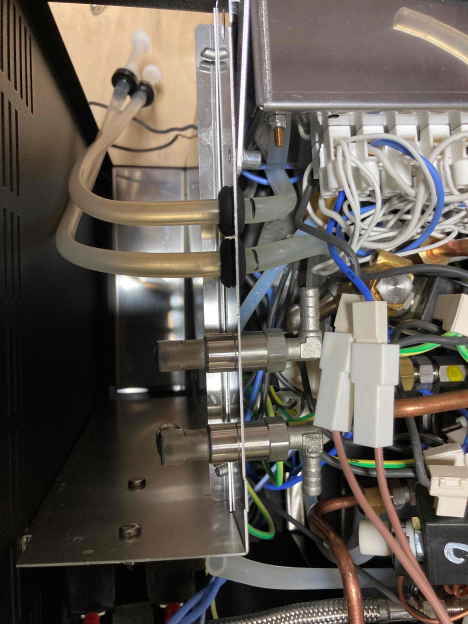
**Step 6)** Disconnect the upper-left wire from the SSR

**Step 7)** Finally, lift the divier panel out to now access the steam pump, top of the steam thermoblock, and other embedded assemblies.
- [Getting started](https://support.ascaso-usa.com/getting-started?hsLang=en#main-content)
- [Barista T](https://support.ascaso-usa.com/getting-started?hsLang=en#barista-t)
- [DUO/DUO PLUS](https://support.ascaso-usa.com/getting-started?hsLang=en#duo-duo-plus)
- [All Ascaso Home Machines](https://support.ascaso-usa.com/getting-started?hsLang=en#all-ascaso-home-machines)
- [Troubleshooting](https://support.ascaso-usa.com/troubleshooting?hsLang=en#main-content)
- [DUO/DUO Plus](https://support.ascaso-usa.com/troubleshooting?hsLang=en#duo-duo-plus)
- [Ascaso Home Machines](https://support.ascaso-usa.com/troubleshooting?hsLang=en#ascaso-home-machines)
- [Baby T Plus](https://support.ascaso-usa.com/troubleshooting?hsLang=en#baby-t-plus)
- [Technical Revision Updates](https://support.ascaso-usa.com/technical-revision-updates?hsLang=en#main-content)
- [Ascaso Home Equipment](https://support.ascaso-usa.com/technical-revision-updates?hsLang=en#ascaso-home-equipment)
- [FAQs](https://support.ascaso-usa.com/faqs?hsLang=en#main-content)
- [Ascaso Home Machines](https://support.ascaso-usa.com/faqs?hsLang=en#ascaso-home-machines)
- [Support](https://support.ascaso-usa.com/support?hsLang=en#main-content)
- [Packaging / Accessories / Etc](https://support.ascaso-usa.com/support?hsLang=en#packaging-accessories-etc)
- [Barista T](https://support.ascaso-usa.com/support?hsLang=en#barista-t)
- [Technical Documentation](https://support.ascaso-usa.com/support?hsLang=en#technical-documentation)
- [Ascaso Home Repair Technicians](https://support.ascaso-usa.com/support?hsLang=en#ascaso-home-repair-technicians)
- [Ascaso Warranty](https://support.ascaso-usa.com/support?hsLang=en#ascaso-warranty)
- [Ascaso USA Return Policy](https://support.ascaso-usa.com/support?hsLang=en#ascaso-usa-return-policy)
- [Ascaso USA Shipping Policy](https://support.ascaso-usa.com/support?hsLang=en#ascaso-usa-shipping-policy)
- [Part Diagrams](https://support.ascaso-usa.com/support?hsLang=en#part-diagrams)
[](https://ascaso-usa.com/)
[mailto:Info@AscasoUSA.com](mailto:Info@AscasoUSA.com)
Copyright © 2026, Ascaso USA